


Cross-site scripting (XSS) is a common security vulnerability that allows attackers to inject malicious code into a website, often in the form of scripts. When users visit the compromised website, the malicious code runs in their browser, potentially leading to data theft, session hijacking, or unauthorized actions. XSS attacks exploit the trust between users and websites, making it crucial for developers to validate and sanitize user inputs to keep websites secure.
EXPLANATION
HOW IT WORKS
Cross-Site Scripting allows attackers to execute malicious scripts in the user’s browser. This can lead to various malicious activities, such as stealing cookies, session tokens, or other sensitive information.
1. User Input: A web application accepts input from a user.
<input type="text" name="username">2. Malicious Input Submission: An attacker submits a malicious script as input.
<input type="text" name="username" value="<script>alert('XSS');</script>">3. Output Without Sanitization: The application displays the input back to the user without sanitizing it, allowing the malicious script to be included in the output.
<p>Hello, <script>alert('XSS');</script></p>4. Malicious Script Execution: When the output is rendered in the browser, it executes the injected script, showing an alert or performing other harmful actions.
VULNERABLE CODE
Below is an example demonstrating how the vulnerability can occur:
<!DOCTYPE html>
<html>
<head>
    <title>Vulnerable XSS Example</title>
</head>
<body>
    <form action="welcome.php" method="post">
        <input type="text" name="username">
        <input type="submit">
    </form>
    <p>Hello, <?php echo $_POST["username"]; ?></p> <!-- Reflecting user input directly -->
</body>
</html>
If the malicious username is saved in the database and later retrieved to display on other pages or to other users, this vulnerability becomes a Stored XSS attack. In Stored XSS, the injected script remains in the database and can affect multiple users each time the data is retrieved and displayed.
In contrast, if the injected script is not stored but merely reflected back immediately in the response, it’s considered a Reflected XSS attack. Reflected XSS occurs in real-time, usually affecting only the user who clicked a malicious link or submitted malicious input.
VARIATIONS OF XSS
- Stored XSS:
- Definition: The malicious script is permanently stored on the target server.
- Example: An attacker injects a malicious script into a blog comment. Whenever any user views that blog post all the comments are loaded for them, thus the script runs in their browser.
- Reflected XSS:
- Definition: The malicious script is reflected off a web server, such as in an error message or search result.
- Example: An attacker sends a malicious link to a user. When the user clicks the link, the script is reflected off the web server and executed in the user’s browser.
- DOM-based XSS:
- Definition: The vulnerability exists in the client-side code rather than server-side.
- Example: An attacker manipulates the DOM environment to execute malicious scripts, often through URL or user input.
ALL THE STEPS IN XSS ATTACK
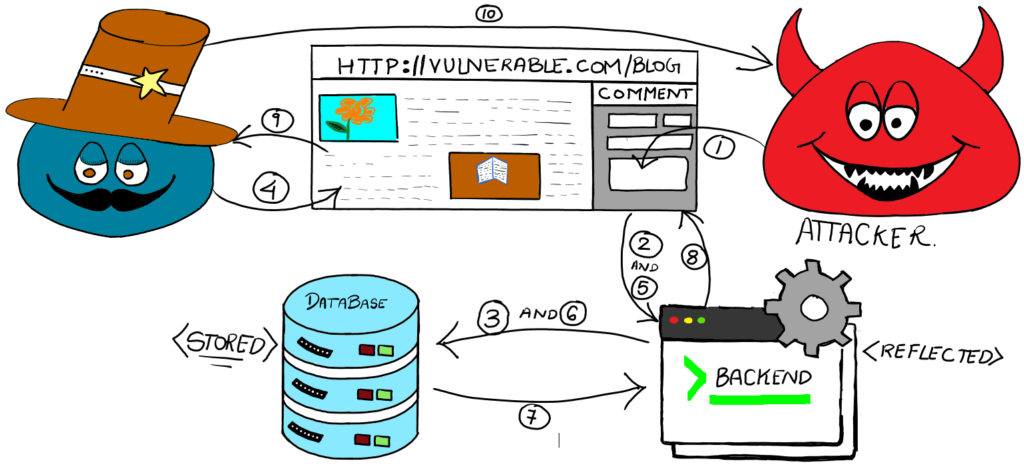
STEPS EXPLAINED
- User Submits Data:
- The attacker submits malicious code (e.g., a script) through a web form or input field on a vulnerable website, such as a comment section.
- Data Submission:
- The web application processes the input data without proper sanitization or validation.
- Stored XSS Path:
- The malicious script is stored in the database for Stored XSS.
- User Requests Page:
- A legitimate user requests a page that includes the stored malicious script.
- Request Submission:
- The web application processes the request and begins assembling the information to send back to the user.
- Retrieving Comments:
- The backend retrieves all comments, including the malicious one, from the database.
- Database Sends Comments:
- This includes the attacker’s malicious comment, allowing Cross-Site Scripting (XSS).
- Response Generation:
- All comments, including the malicious one, are sent to the user’s browser and displayed on the page.
- Impact on User:
- The user’s browser executes the malicious script as part of the page, potentially stealing sensitive data, like cookies or session tokens, or performing actions on the user’s behalf.
- Attacker Receives Data:
- The stolen data is sent back to the attacker, granting unauthorized access to the user’s information or allowing session hijacking.
IMPACT
Generic Consequences:
- Data Breach: Unauthorized access to sensitive data. For example, attackers can view confidential user information.
- Data Manipulation: Alteration, insertion, or deletion of data. For example, attackers can modify financial records.
- System Compromise: Potential full control over the affected system. For example, attackers can gain administrative privileges.
Business Impact:
- Financial loss, legal consequences, and reputational damage. For example, a company may face lawsuits and loss of customer trust.
- Compliance Issues: Violations of data protection regulations (e.g., GDPR). For example, non-compliance with GDPR can lead to significant fines.
REMEDIATION
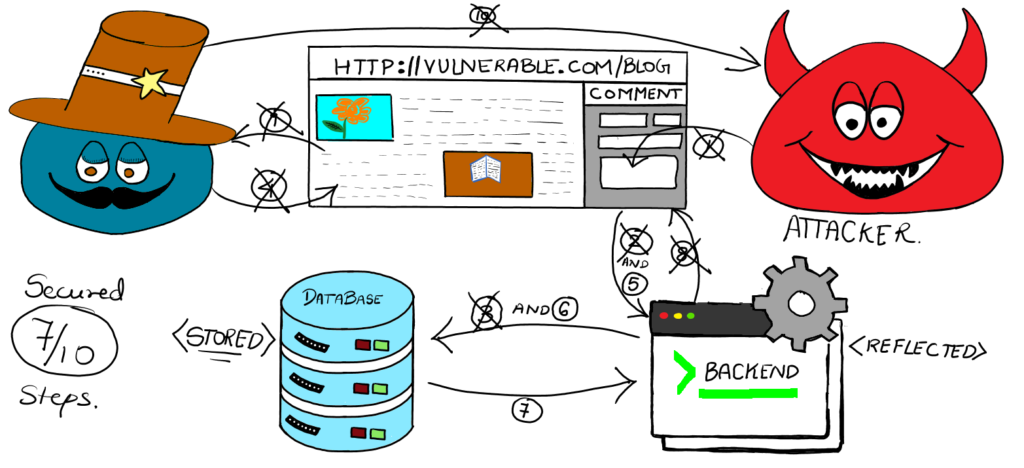
STEP 1: User Submits Data:
- Prevention: Frontend Input Validation
- Description: Ensure that all user inputs are validated against a strict set of rules to filter out potentially malicious input.
- Protection: This Prevents attackers from submitting scripts as input by checking for and rejecting any input that does not conform to expected patterns.
STEP 2: Data Submission:
- Prevention: Backend Input Sanitization
- Description: Sanitize user inputs before any kind of processing is done on the input.
- Protection: Removes or escapes characters that can be used in scripts, ensuring stored data cannot execute scripts when retrieved.
STEP 3: Stored XSS Path:
- Prevention: Database Input Sanitization
- Description: Sanitize user inputs before storing them in the database.
- Protection: Removes or escapes characters that can be used in scripts, ensuring stored data cannot execute scripts when retrieved.
❗ Doing both Backend and Database Input Sanitization is important to avoid any different outcome for stored and reflected XSS
STEP 4: User Requests Page:
- Prevention: Content Security Policy (CSP)
- Description: Implement a CSP to control which resources can be loaded and executed on the webpage.
- Protection: Prevents the execution of unauthorized scripts, even if they are present on the page.
STEP 8: Response Generation:
- Prevention: Proper Output Encoding
- Description: Encode all data before including it in the HTML output.
- Protection: Converts characters into a format that prevents them from being interpreted as executable scripts
STEP 9: Impact on User:
- Prevention: Secure JavaScript Practices
- Description: Avoid using eval(), innerHTML, or other potentially dangerous methods in JavaScript.
- Protection: Reduces the risk of executing malicious scripts by using safer methods to manipulate the DOM.
STEP 10: Attacker Receives Data:
- Prevention: SameSite Cookie Attribute
- Description: Set the SameSite attribute on cookies to Strict or Lax.
- Protection: Prevents cookies from being sent in cross-site requests, protecting against cookie theft through XSS.
CONCLUSION
Cross-site scripting (XSS) remains one of the most prevalent and dangerous vulnerabilities in web applications. By understanding the different types of XSS and implementing comprehensive prevention measures at each step of data processing and user interaction, developers can significantly reduce the risk of such attacks. Input validation, sanitization, content security policies, secure coding practices, and proper output encoding are essential components of a robust defense strategy against XSS. Regularly updating security practices and educating developers on potential vulnerabilities are also critical in maintaining a secure application environment. By taking these proactive steps, we can protect both our users and our systems from the potentially severe consequences of XSS attacks.